OpenRocket · in your browser

OpenRocket 24.12, in the browser

Rocket in Cloud runs OpenRocket 24.12 in the browser, with the same simulator, windows and physics as the desktop version. It adds live co-editing, edit history, sharing, and tools for recovery, ballast and fin flutter.

What’s new
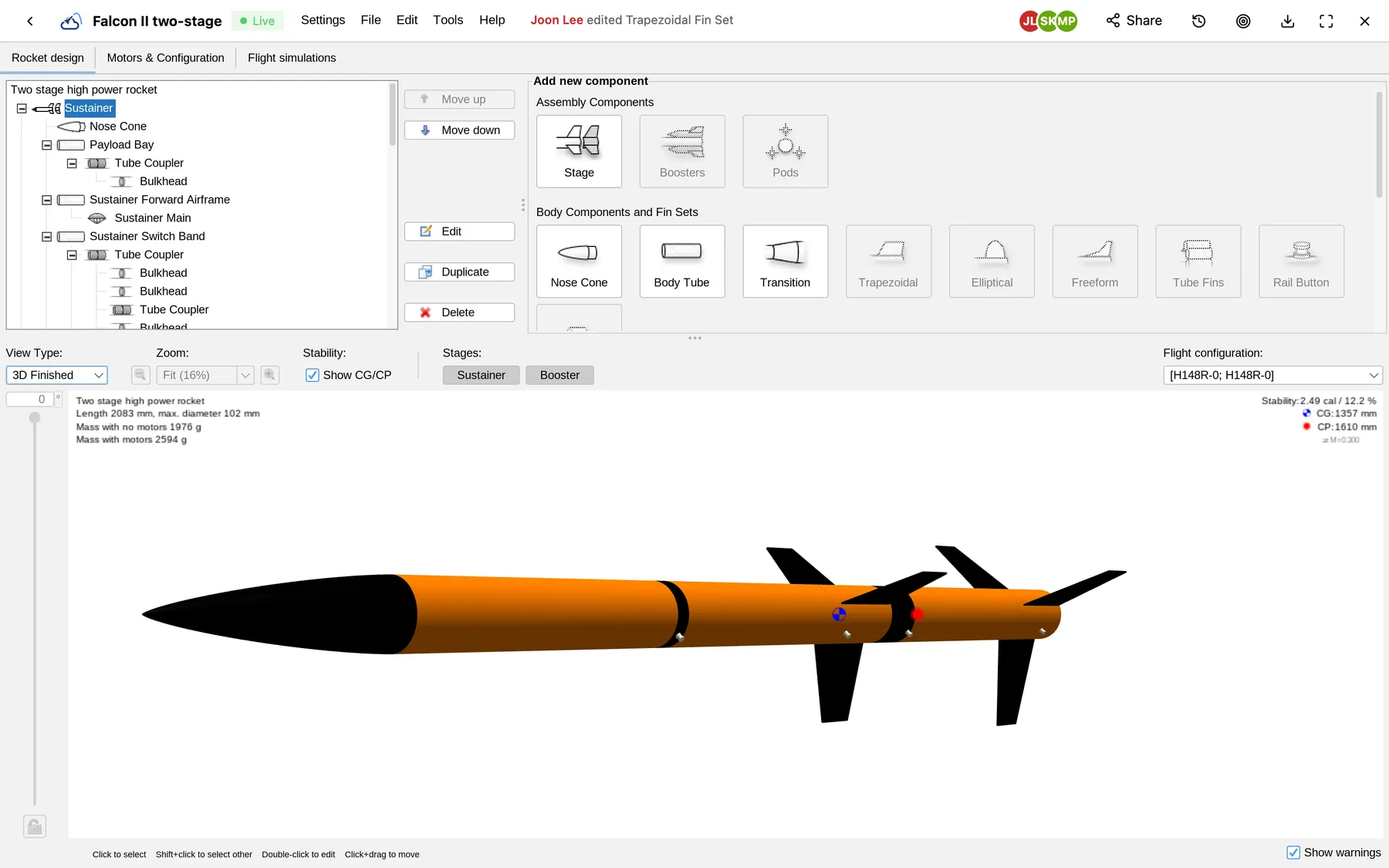
rocketincloud.com — Falcon II two-stage
A two-stage rocket in OpenRocket’s 3D view, with three people editing it together
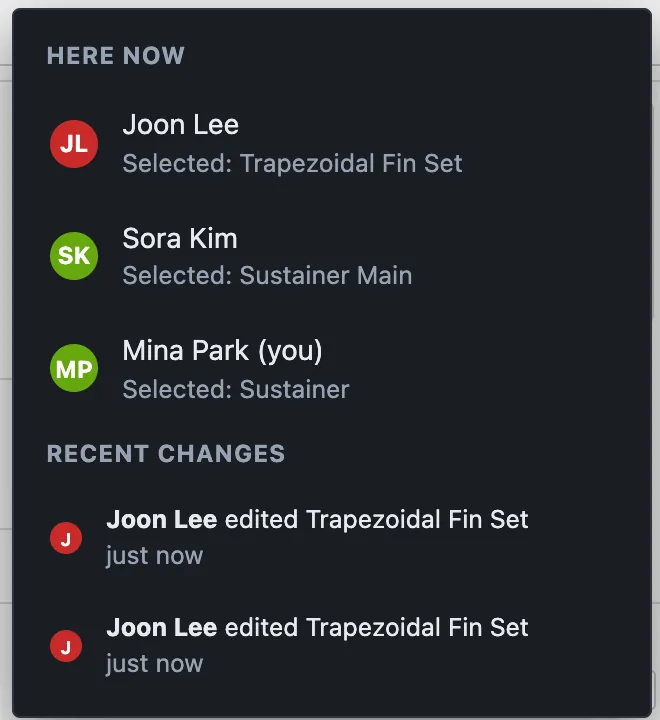
Who is here and what each person has selected
Comparison

Compared with desktop OpenRocket

Everything in desktop OpenRocket works the same way. These are the additions.

FeatureDesktop OpenRocketRocket in Cloud
Runs in the browser, nothing to install—
Several people editing one design at the same time—
Saved online as you work, on every device—
Edit history: who changed what, and undo one person’s changes—
Share a design as “Can edit” or “Can view”—
Custom motors shared with everyone on a designYour own folder
Parachute size and ejection charge calculator—
Nose weight (ballast) for a target stability—
Fin flutter check against every simulation—
3D-printed parts from STL files, as mass and balance—
Fin airfoils and root fillets in the 3D view and 3D exports—
Rocket optimization on OpenRocket’s examplesUp to 19% short of the bestWithin 0.03%
Live co-editing

Edit a design together in real time

Several people can open and edit the same design at once. Each change appears for everyone as soon as it is made, so there are no copies of the file to pass around.

  • Avatars show who is here and which part each person has selected
  • The header tells you what just changed: “Joon Lee edited Trapezoidal Fin Set”
  • Invite people by their Google email as Can edit or Can view
  • Viewers can look around the design but cannot change it
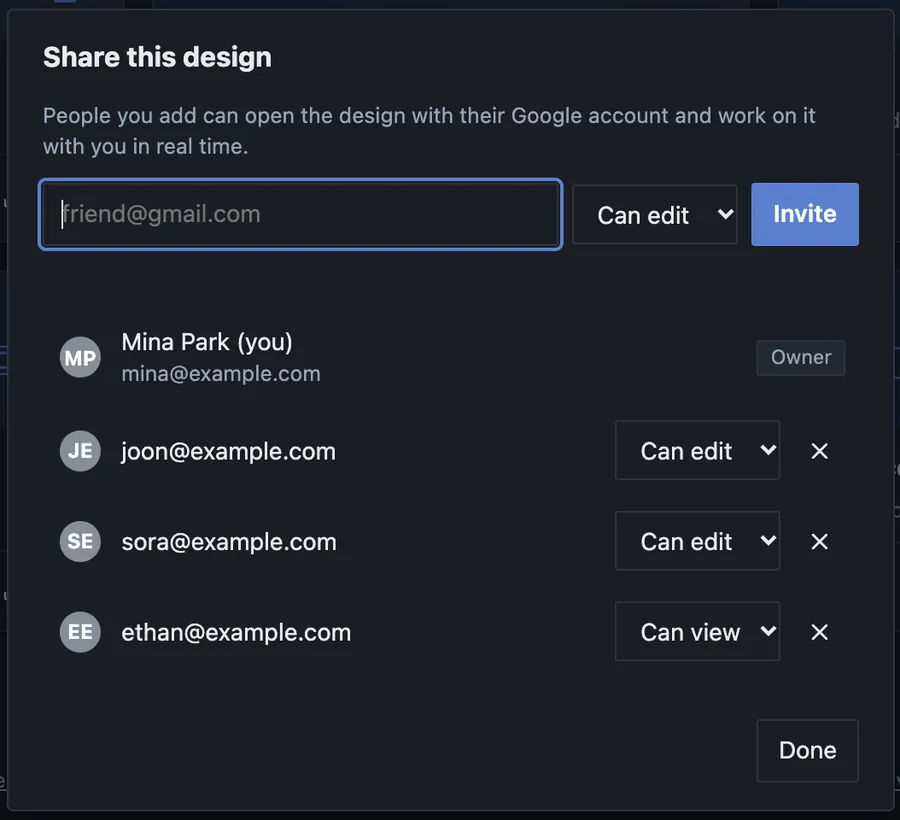
rocketincloud.com — Share this design
Sharing a design with three teammates, two who can edit and one who can view
Who is here now, and the recent changes
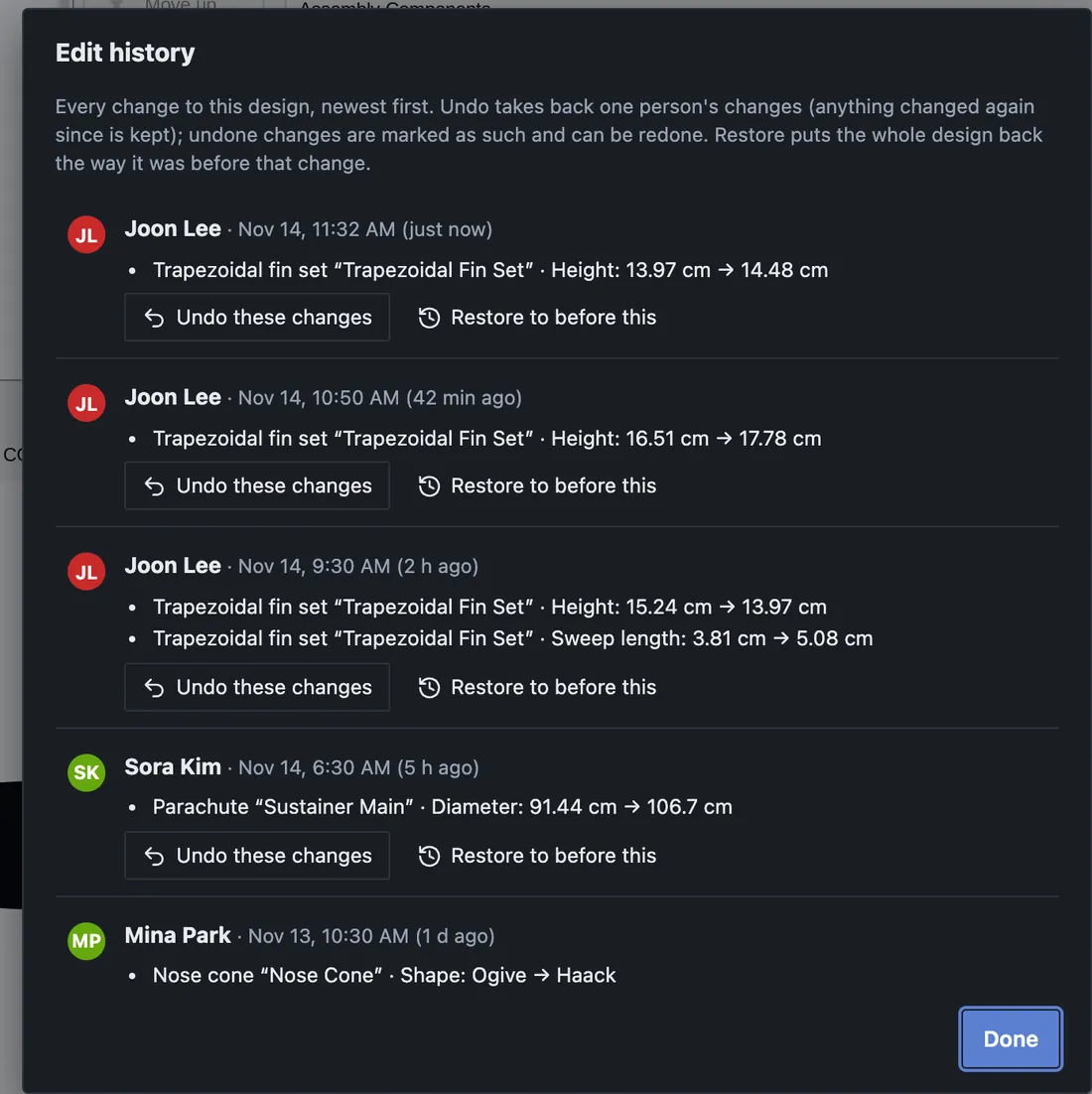
Edit history

A readable list of every change

The history lists each change in plain words, such as “Nose cone · Length: 32.4 cm → 35.6 cm”, with who made it and when. Changes can be undone, and earlier versions restored.

  • Undo one person’s changes, keeping everything changed since
  • Restore the whole design to how it was at any moment
  • Undone changes stay listed, and can be redone
  • A downloadable copy is saved every 10 minutes while people edit
rocketincloud.com — Edit history
The edit history: changes by Joon Lee, Sora Kim and Mina Park with undo and restore buttons
Online storage

Designs saved online

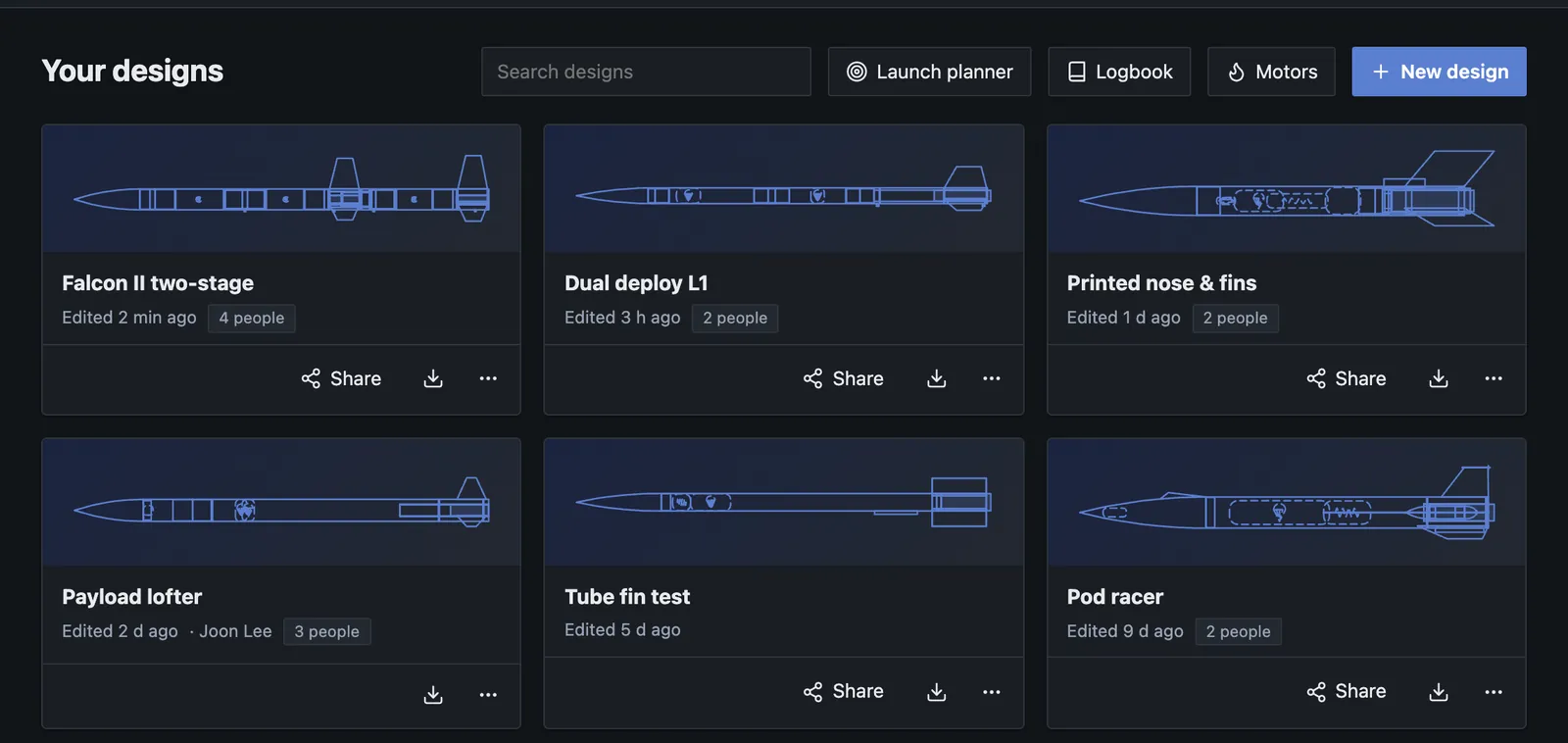
Designs are saved online and open on any computer you sign in to, with a drawing of each rocket on its card. Start from one of OpenRocket’s examples, or upload your existing .ork files.

  • Changes are saved automatically; there is no Save button
  • Download any design as an .ork file that opens in desktop OpenRocket
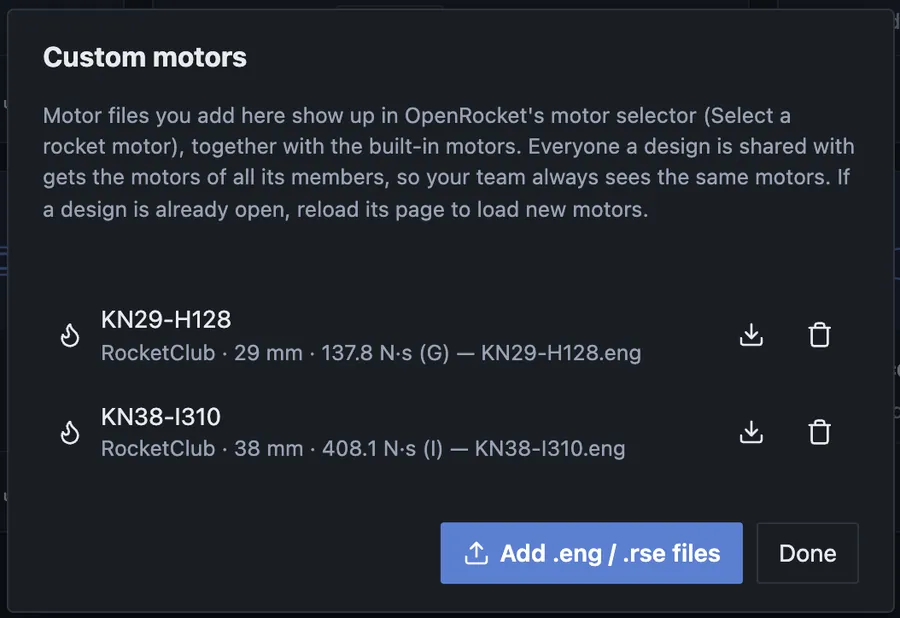
  • Upload custom motors (.eng, .rse) once; everyone on a design gets them
  • Duplicate a design to try an idea without touching the original
rocketincloud.com
The designs page with six rocket designs, each with its drawing
Custom motors added from .eng files
Engineering tools

Recovery, ballast and fin flutter calculations

These tools are added to OpenRocket’s Tools menu and to every fin set. They work from your design, so the results update when the design changes.

Recovery

Parachute and ejection charge sizing

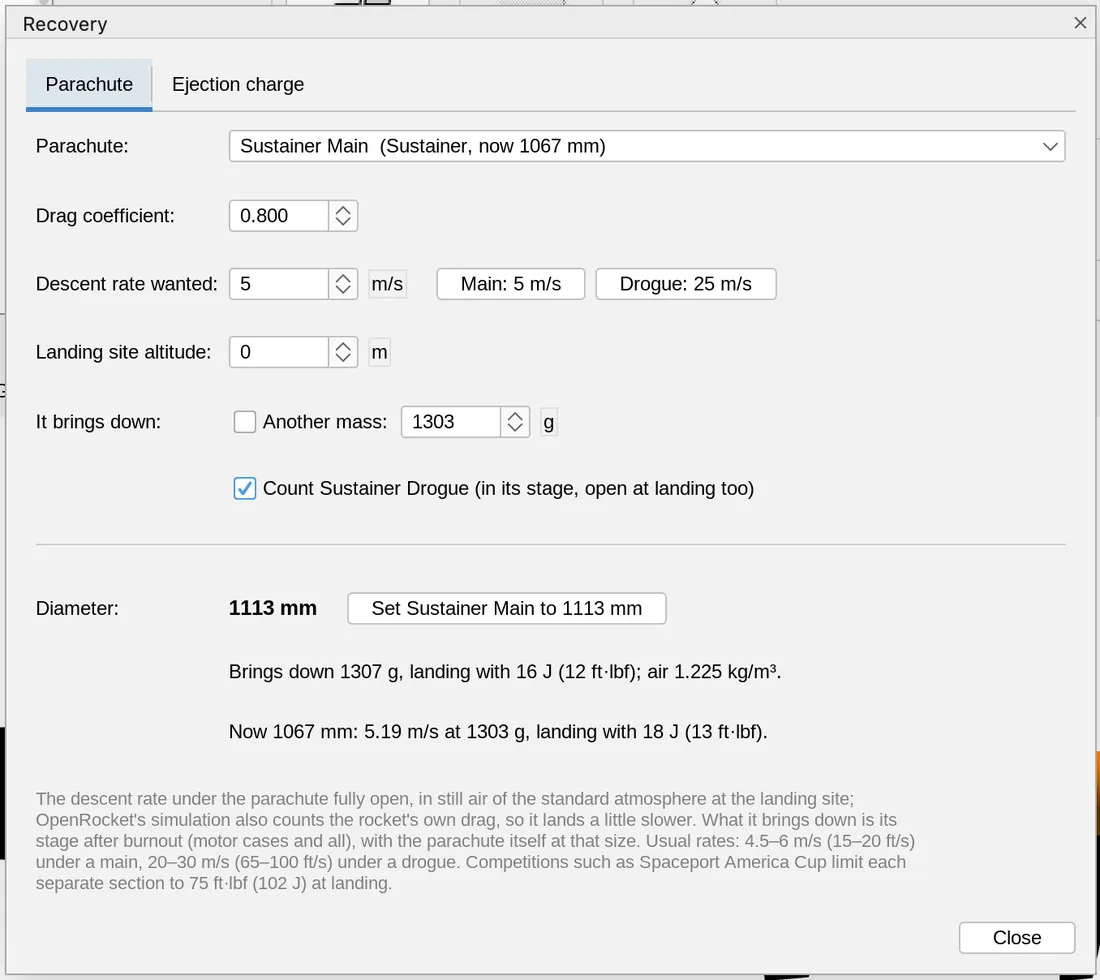
Tools → Recovery works out the mass each parachute brings down from the design itself: its stage after burnout, the other recovery devices deployed with it, and the air at your landing site.

  • The diameter for the descent rate you want, and the landing energy (competitions cap it at 75 ft·lbf)
  • One click sets the parachute in the design
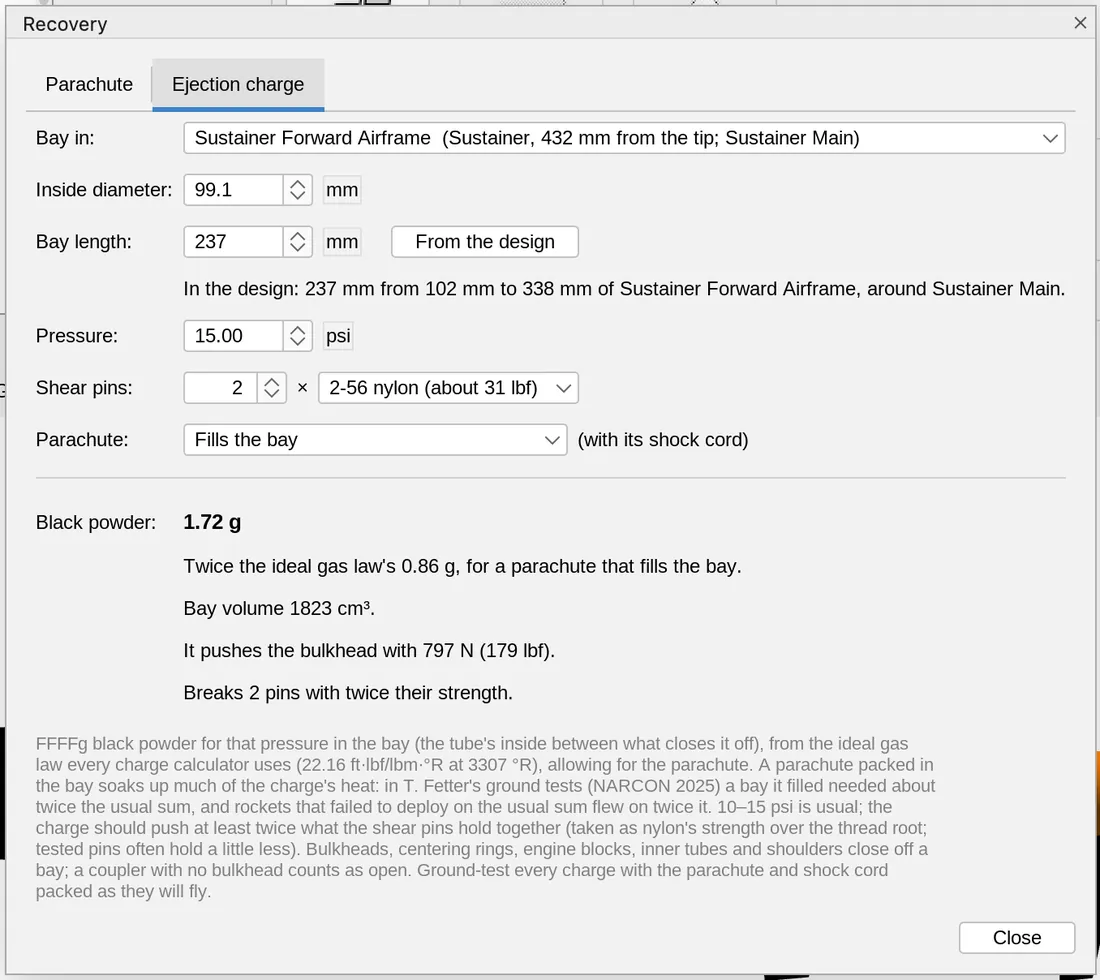
  • Black powder for the bay at your pressure, measured from the design
  • Allows for how full the parachute packs the bay, from published ground tests (NARCON 2025)
  • Checks your shear pins break with a 2× margin
rocketincloud.com — Tools → Recovery
The ejection charge calculator: 1.72 g of black powder for a 237 mm bay, with the force on the bulkhead and shear pin check
The parachute calculator: 1113 mm for 5 m/s
Ballast

Nose weight calculation

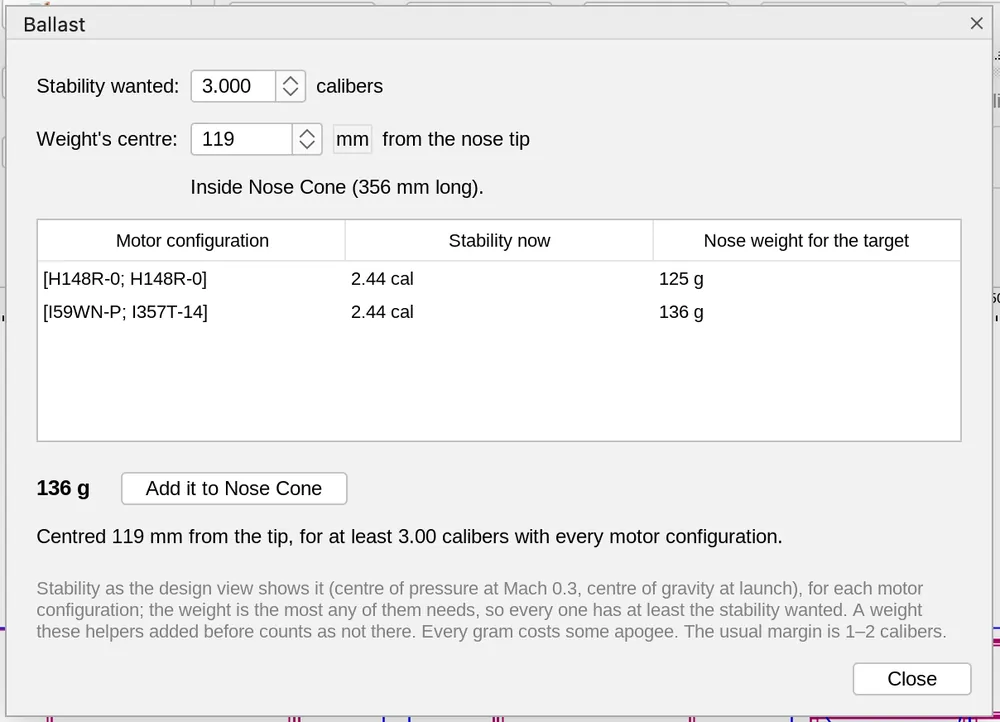
Tools → Ballast finds the nose weight that gives every motor configuration at least the stability you want, using OpenRocket’s own mass and stability calculation.

  • Choose the stability you want and where the weight sits in the nose
  • See each motor configuration’s stability now, and the weight it needs
  • Add it to the nose cone in one click; change or remove it the same way
  • Every change can be undone, like any other edit
rocketincloud.com — Tools → Ballast
The Ballast tool: 136 g of nose weight for 3 calibers with both motor configurations
Fin flutter

Fin flutter speed

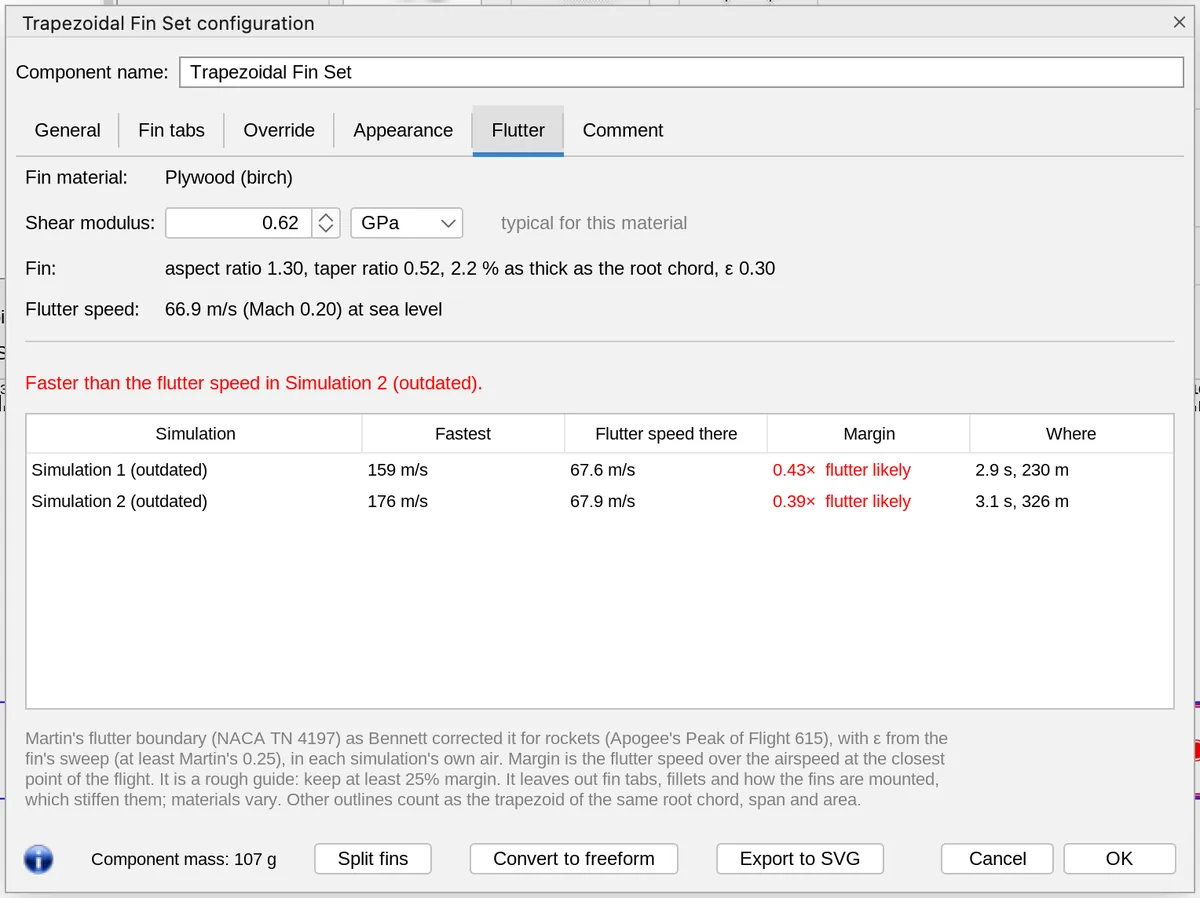
Every fin set has a Flutter tab showing the speed at which its fins would start to flutter, based on their shape, thickness and material. Each simulation is checked against it, using that flight’s air conditions.

  • Flutter speed from Martin’s NACA boundary, as corrected for rockets
  • The margin for each simulation, and where in the flight it is closest
  • A warning when a flight is faster than its fins’ flutter speed
  • Typical stiffness for OpenRocket’s materials, or enter your own
rocketincloud.com — Fin set → Flutter
The Flutter tab warning that two simulations fly faster than the fins’ flutter speed
3D and 3D printing

3D views and 3D-printed parts

View the rocket in 3D in any browser, add 3D-printed parts to the design, and export fins with their airfoils and fillets.

3D view

OpenRocket’s 3D views in the browser

Desktop OpenRocket draws its 3D views with OpenGL, which a browser can’t run. Rocket in Cloud redraws them from OpenRocket’s own 3D shapes, so the 3D Figure, 3D Unfinished and 3D Finished views work on any computer, with your paint and decals.

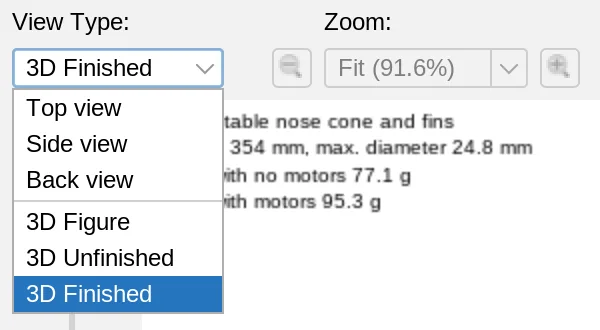
  • Pick 3D Figure, 3D Unfinished or 3D Finished under the rocket figure, as in OpenRocket
  • Drag to turn the rocket, right-drag to move the light, scroll to zoom
  • Click a part to select it, shift-click to add more, double-click to edit it
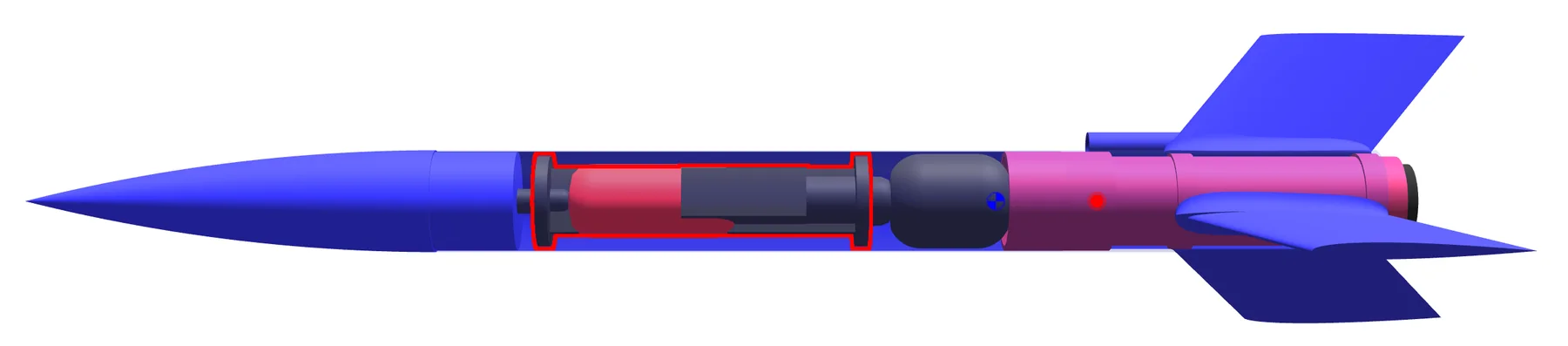
  • 3D Figure shows what is inside: parachutes, bulkheads, motor mounts and your printed parts
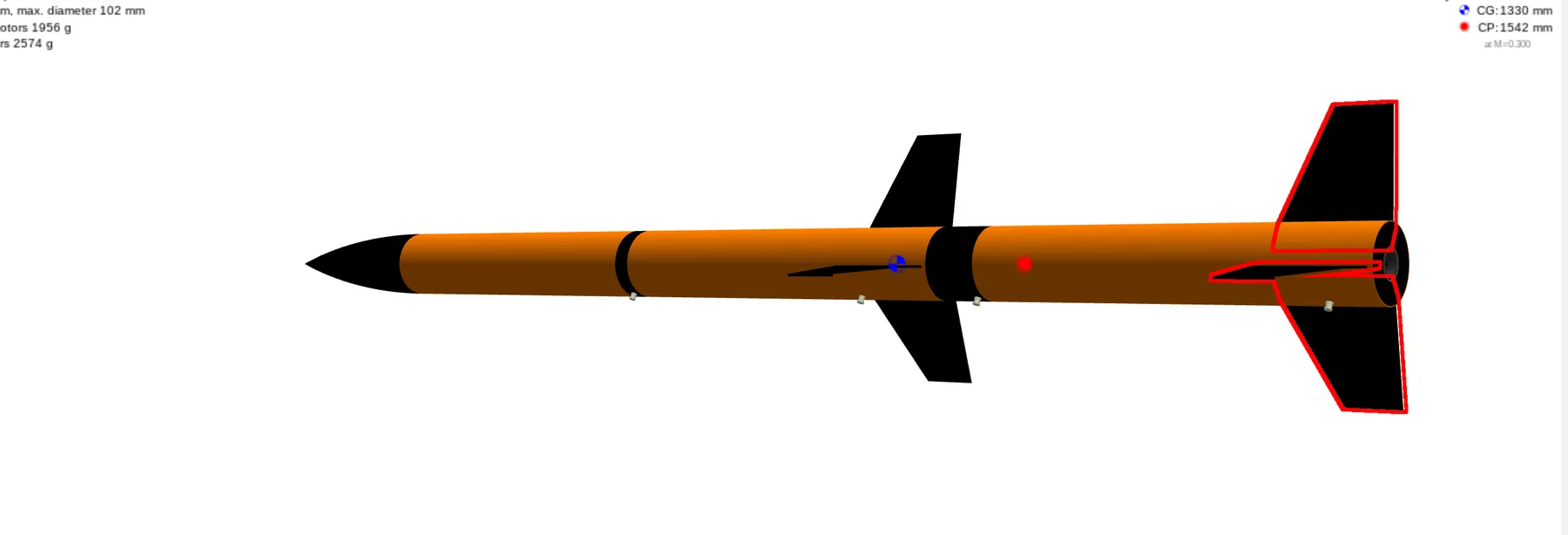
rocketincloud.com — Falcon II two-stage, 3D Finished
The two-stage rocket in the 3D Finished view at a three-quarter angle, with its booster fin set selected and outlined in red
The view list: Top, Side and Back view, then 3D Figure, 3D Unfinished and 3D Finished
3D-printed parts

Import STL parts

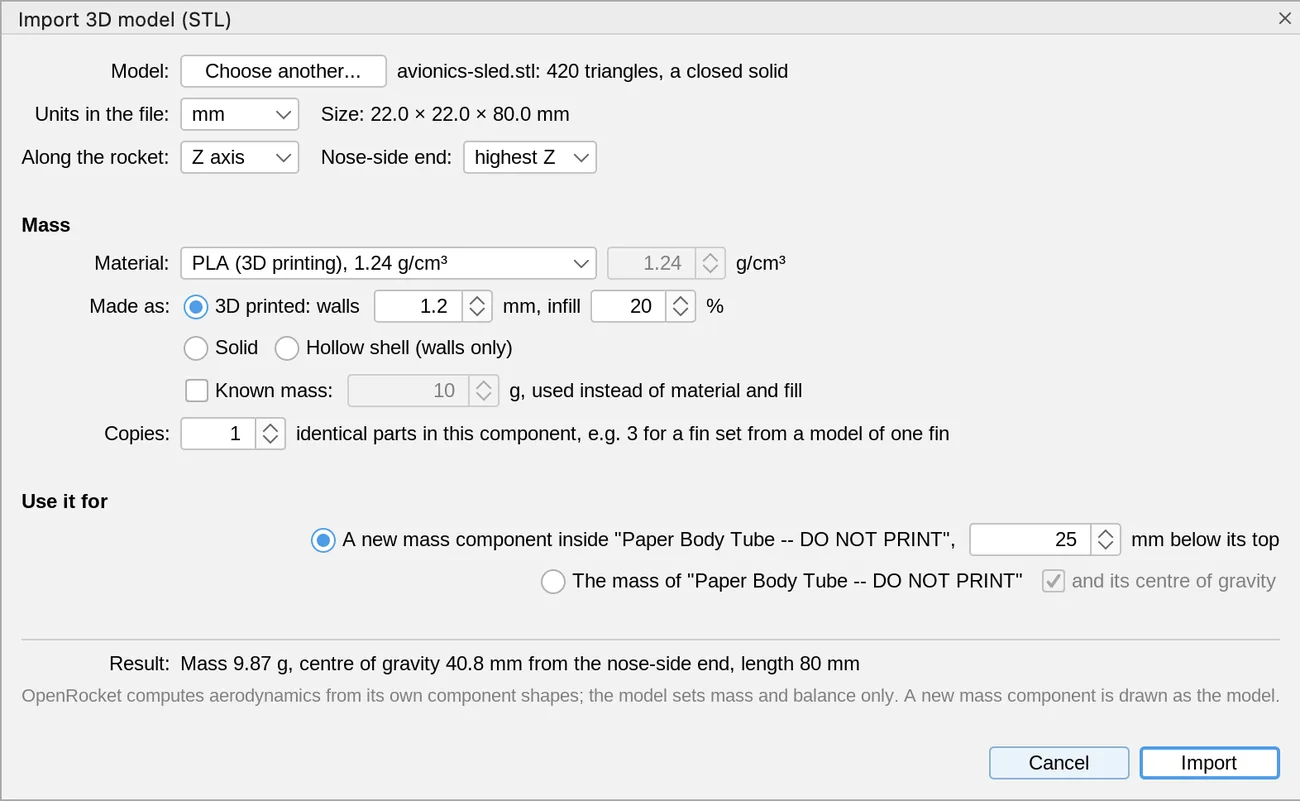
Tools → Import 3D model (STL) turns a printed part, such as an avionics sled, a bulkhead or a camera shroud, into real mass and balance, so the stability and every simulation account for it. Aerodynamics still come from OpenRocket’s own shapes.

  • Set the file’s units, which axis runs along the rocket and which end faces the nose
  • Mass from printed walls and infill, a solid part or a hollow shell, or the mass you weighed
  • Add it as a new part, or give its mass and centre of gravity to the part you selected
  • Drawn as the model itself in the 2D and 3D views, shared with your team and kept in downloaded .ork files
rocketincloud.com — Tools → Import 3D model (STL)
Importing avionics-sled.stl: 22 by 22 by 80 mm, PLA printed with 1.2 mm walls and 20% infill, giving 9.87 g, as a new part 25 mm inside the body tube
The imported sled drawn inside the see-through body tube in the 3D Figure view, outlined in red
Fins

Airfoils and fillets in 3D

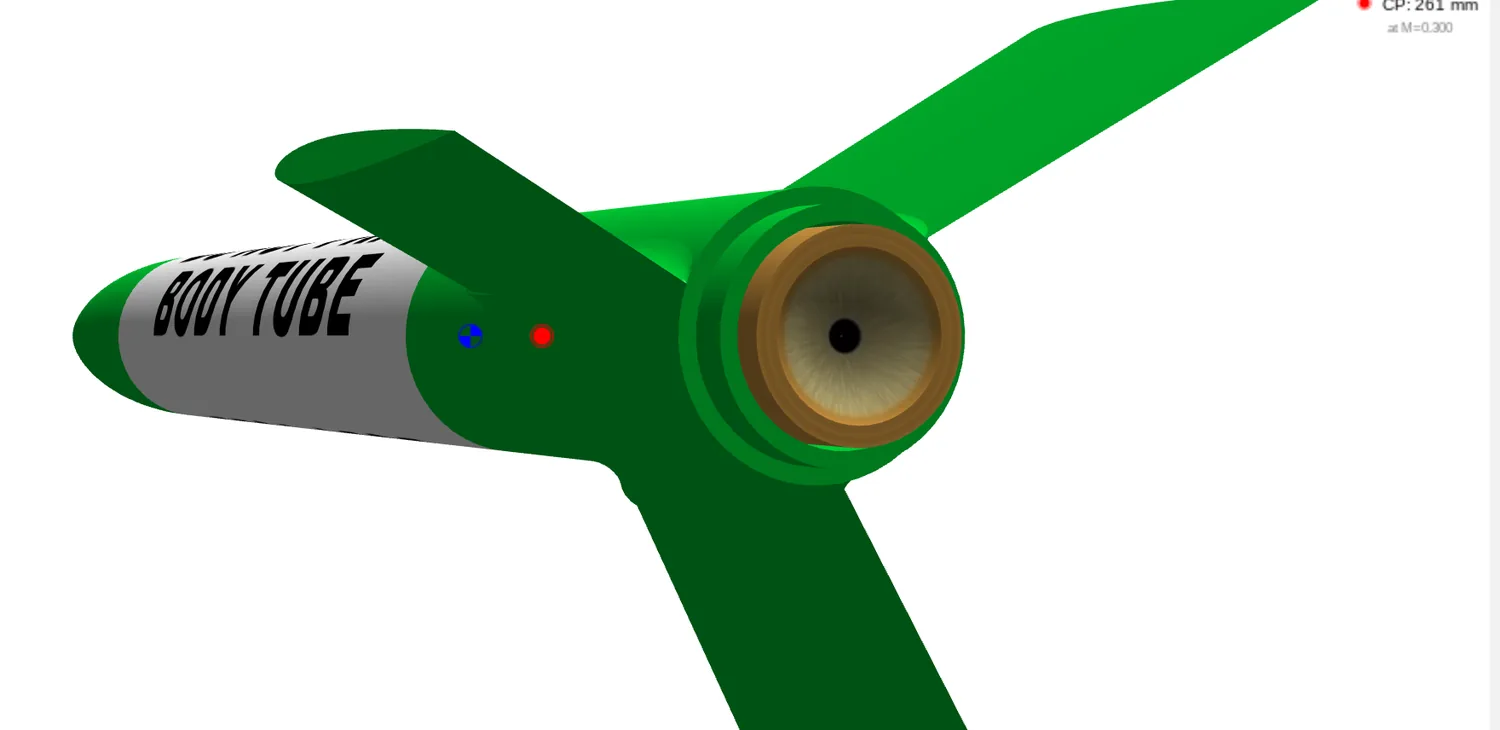
OpenRocket uses each fin set’s cross section in its drag and its root fillets in its mass, but leaves both out of its 3D shapes. Rocket in Cloud includes them: rounded and airfoil fins, and fillets on both sides of every fin that taper off at the fin’s edges.

  • See the real fin shape in the 3D view before you print
  • 3D exports (OBJ) include the cross section and the fillets, ready for your slicer
  • Fillets take the radius set in each fin set’s dialog
  • Fixes OpenRocket 24.12’s “3D printing” export, which failed on some designs such as its pod examples
rocketincloud.com — 3D Finished
Close-up of the airfoil fins of a 3D-printable rocket, with fillets where each fin meets the body
The fin set dialog: fin cross section Airfoil, 4 mm thickThe fin set dialog: root fillets of 6 mm radius
Other improvements

Optimizer, exports and Mac support

Improved optimizer

On OpenRocket’s examples, rocket optimization finds designs within 0.03% of the best known result; the original can fall up to 19% short.

Exported files

Simulation CSVs, PDF reports and 3D exports you make in OpenRocket are kept under the folder button for download.

Mac shortcuts

⌘ shortcuts and ⌘-click selection work as in desktop OpenRocket for Mac; copy and paste go through your clipboard.

Start a design

Sign in with Google, open one of OpenRocket’s examples or upload your .ork file, and share it with your team.

Free for a week · Sign in with a Google account · Nothing to install · Pricing